TikTok is one of the most popular video-sharing networks, with millions of users every day. Managing your profile’s privacy is crucial for a safe and enjoyable user experience. One effective way to protect your online presence is to hide followers on TikTok. This not only safeguards your privacy but also shields you from unwanted scrutiny, thereby supporting your growth strategies. But is it as simple as it sounds?
In the age of sharing, many users want to protect the privacy of their TikTok followers. Whether for personal reasons or to avoid being exposed—protecting your account has never been more important. Fortunately, TikTok offers excellent privacy settings, allowing you to customize your profile to suit your needs.
If keeping your follower list private is your top priority, this guide will walk you through the process step by step. From simply navigating private TikTok account to keeping your account private, you’ll learn how to manage your online presence in no time. Whether you’re a content creator or just a casual user, mastering TikTok privacy settings will enhance your user experience and make your profile more secure.
Understanding TikTok Privacy Settings
- Public vs. Private Accounts: The main difference between public and private accounts is visibility: Public accounts allow anyone to view your posts, videos, and followers, while private accounts restrict access to only the users you approve.
- Follower Visibility: While TikTok doesn’t have a specific “hide followers” feature, users can utilize various privacy settings to control who has access to their content. We’ll take a closer look at these privacy settings in this blog post!
- Managing Interactions: With TikTok, you can control who can comment on your videos, send you direct messages, or combine your content in Duets or Stitches. By adjusting these settings, you can prevent spam and ensure a positive user experience.
- Content Sharing Settings: You can also choose who is allowed to download or share your videos outside the app. By disabling downloads, you ensure that your content stays with your audience.
- Personalized Ads and Privacy: TikTok privacy settings allow you to manage ad personalization and data sharing. You can minimize data tracking and receive tailored ads based on your interests by adjusting these settings!
- Restricted Mode and Screen Time Management: For users who want to limit inappropriate content or manage app usage, TikTok offers Restricted Mode and screen time settings. These features are especially useful for younger users or those who want to balance their time spent on the app.
By familiarizing yourself with these features, you can take full control of your TikTok experience. By customizing your settings, you not only protect your privacy but can also use the platform safely and effectively.
Reasons to Hide Your Followers on TikTok
- Privacy Concerns: For privacy reasons, it’s important to avoid disclosing your personal or professional networks.
- Professional Reasons: For professional reasons, it’s important to maintain a clean profile, as this prevents competitors from assessing your followers.
- Controlled Engagement: This helps build a loyal and authentic audience without unwanted outside interference.
- Content Strategy: When it comes to content strategy, it’s important to prevent others from copying your audience-building tactics.
How do I hide my followers on TikTok?
There’s no direct way to hide followers on TikTok, but there are other ways to protect your privacy. This guide shows you how to hide followers on TikTok. Are you ready to take control of your account’s privacy? Let’s get started.
Option 1: Make Your Account Private
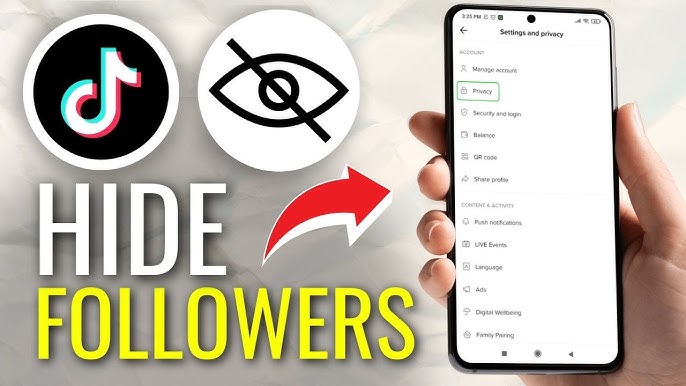
On your TikTok page, tap the hamburger icon (☰) in the top-right corner. From the menu, select Settings and Privacy. Turn on Private Account to allow only approved friends to access your account.
Option 2: Block users you don't want to see
You can block someone on TikTok by going to their profile. There's a share icon in the top-right corner of their profile. Tap it, and a menu will appear at the bottom. You can choose either “Report” or “Block,” depending on what you want to do. If you choose “Block,” they won't be able to see your followers or interact with your content.
Option 3: Change your privacy settings on TikTok
- Go to Settings and Privacy, as mentioned above.
- Go to Privacy > Interactions, as shown in the image below. You’ll have the option to limit comments, mentions, direct messages, and more. Select the options that suit your preferences.
- Under Content & Presentation > Audience Control, you can also restrict your profile, future videos, and live videos to users 18 and older.