Want to change your Instagram username? Maybe you need a fresh brand image, have a better idea, or just want to fix a typo.
No problem! Here’s how to change instagram username in just a few steps—plus some smart tips for finding the perfect name.
How to Change Your Instagram Username
If you want to change instagram username, just follow these steps:
1. Open the Instagram app and go to your profile.
Launch the app on your smartphone or open Instagram in your browser.
2. Go to Settings
Tap your profile picture in the bottom right corner, then tap “Settings” in the top right corner.
3. Select “Account Overview” and then “Profiles”
Here you’ll see your linked Instagram profiles at a glance.
4. Decide which profile you want to edit
If you have multiple accounts, select the correct one.
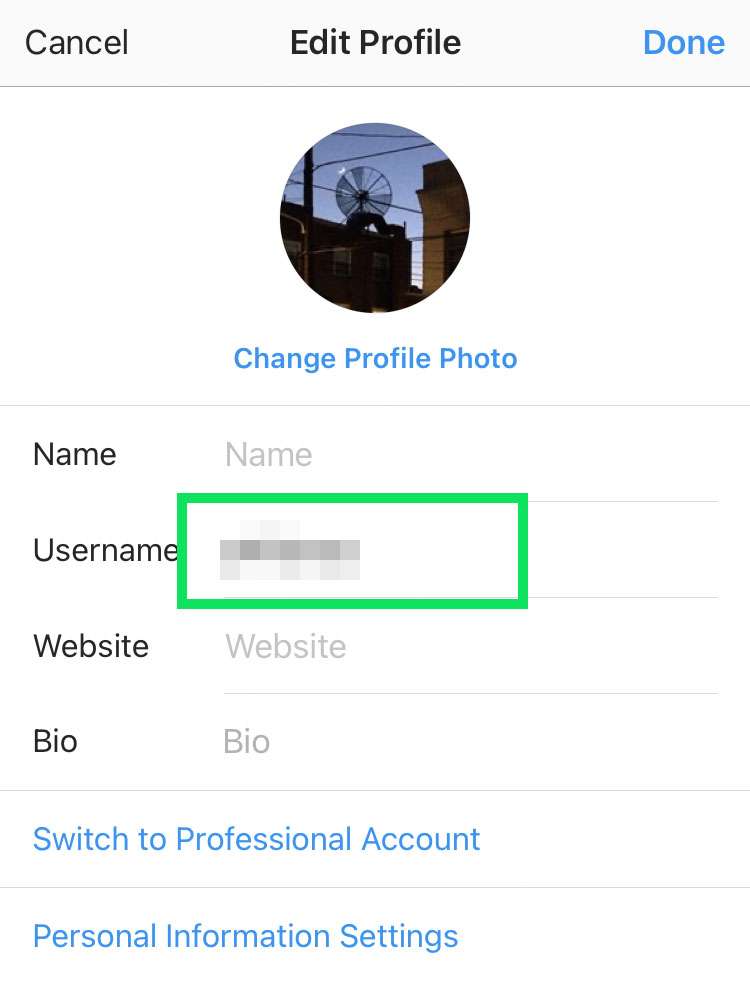
5. Tap “Name” or “Username”
Here you can change either your Instagram username or display name.
6. Enter the new name and check its availability
If your desired name is already taken, you can add dots or underscores to make it unique.
7. Don’t forget to save
Tap “Done” to apply the changes.
Frequently Asked Questions About Changing Your Instagram Name
Can I get my old Instagram name back?
Maybe—but only if that name isn’t already taken.
Is there a limit on how many times I can change my name?
Yes! Instagram only allows a limited number of changes within a short period of time. If it doesn’t work, you’ll have to wait a few days.
Why can’t I change my Instagram username?
If the instagram username you want isn’t available or you’ve changed it too often, you’ll need to wait a bit or try a variation of the name.
Tips for the Perfect Instagram Name
A good name makes it easier for people to find you and sticks in their minds. If you still need inspiration, check out this article: Tips and Ideas for instagram username change. Here are a few quick tips:
- Choose a name that’s easy to remember.
- Keep it short and snappy.
- Use keywords that reflect your niche.