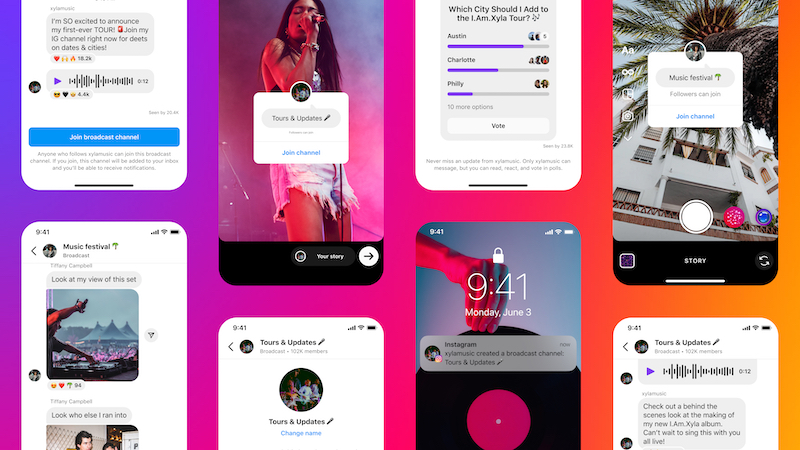
An instagram broadcast channels is a public one-to-many channel within Direct Messages (DMs)—sort of like a newsletter right inside the app. Only you (and people you invite) can post in it; your subscribers receive each message as a DM and can react with emojis or participate in polls, but they can’t post themselves. What makes it special: Your messages reach your most loyal followers directly, without the algorithm getting in the way.
What is a Broadcast Channel?
Imagine a group DM where only one person is talking: you. Instagram broadcast channel is located in your inbox, but instead of a back-and-forth conversation, it’s a one-way street. You send updates, your subscribers read them and react—much like a channel in messaging apps such as WhatsApp or Telegram.
For you, this means you have a direct line to the people who have actively chosen to follow you. Because your message arrives as a notification, it’s highly likely to be seen—unlike a post in the feed, which has to go through the algorithm first.
How does a broadcast channel work?
In your channel, you can share text, photos, videos, links, GIFs, and polls. Your subscribers can’t post themselves, but they’re not silent: They react with emojis, vote in polls, or answer specific questions you ask. This keeps things organized while still making the channel lively.
A nice side effect: A “Reply with the word YES, and I’ll send you…” works especially well here because you’re already in each other’s DMs.
Who can create a broadcast channel?
You need a professional profile (Creator or Business). In the past, this feature was tied to a large number of followers (often 10,000), but Instagram has since rolled it out widely—so just check your app to see if you already have it. By the way, you can create multiple channels, such as one for general updates and one for a specific offer.
How do you create a broadcast channel?
- Open your message inbox using the icon in the top right corner.
- Tap the pencil icon in the top right corner to create a new message.
- Select “Create Channel” (if the feature is enabled for you).
- Give your channel a name and get started with your first message.
Since a channel doesn’t grow through the algorithm, it’s best to promote it yourself—for example, with a mention in your Story or via the link in your bio.
Tips for a Vibrant Broadcast Channel
- Post regularly, but don’t flood the feed. Posting two to four times a week keeps the channel vibrant. Posting multiple times a day will quickly lead people to mute or leave the channel.
- Offer exclusive added value. The strongest channels are those that offer something you can’t find anywhere else—a behind-the-scenes look, early access, or a personal insight.
- Incorporate interaction. A poll or a question every now and then gets your subscribers to do more than just read along—polls generate significantly more engagement than plain text.
- Promote the channel. Since it won’t grow through the algorithm on its own, you’ll need to actively draw attention to it—in your Story, via the link in your bio, and occasionally in a Reel.