On Instagram, you share your photos with users from all over the world. If you want to limit who can see your posts to just friends and acquaintances, set your Instagram private account.
For profiles with this setting, only followers can see the posts. This setting isn’t suitable for a major career as an influencer. However, if you’re a hobby photographer and want to control who sees your content, you can hide your content from other Instagram users.
Making Your Account Private – How to Find the Setting
You can adjust Instagram private settings setting directly in the app on your Android phone or iPhone:
-
Open the Instagram app.
-
Go to your profile.
-
Tap the three bars.
-
At the bottom, select the gear icon to open Settings.
-
Go to the Privacy section.
-
In the Connections section, tap Account Privacy. On the right, you’ll see the current setting. By default, it’s set to Public.
-
Slide the “Private Account” toggle to the right.
-
You can now take a closer look at your followers. If you want, you can remove users here who shouldn’t be able to view your posts.
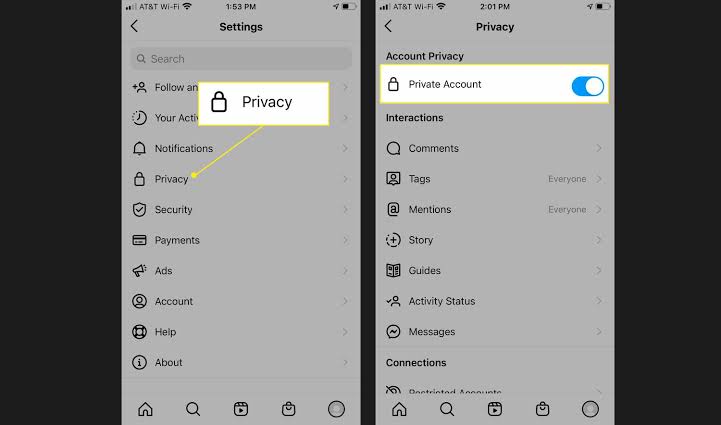 Instagram profile private is now complete. However, be sure to check your privacy settings on other social networks. For example, if you share an Instagram post on Twitter using your private account, it may be visible to all users. You can use the same method to set your profile back to “public.”
Your followers won’t receive a notification that you’ve changed your profile’s visibility. For example, if other users try to access your posts via your profile link, they’ll be informed of your private setting. If you view your profile while not logged in, you should also see that your account is set to “private.”
Want to View Private Profiles with a Viewer?
There are various services and apps online that promise to give you access to non-public content. We warn against such Instagram profile viewers. There is no legitimate way to bypass this setting. Often, these are actually fraudulent apps that, for example, trick you into subscription traps or install Trojans on your phone and computer. Typically, scammers try to get you to download an additional app or participate in a survey.
Often, you’re asked to enter your cell phone number to activate the private profile viewer. In the background, you’re signing up for a paid subscription, but you still won’t have access to the hidden content. If you use a third-party app, you also risk having your account suspended. If you want to view a private profile, ask the owner to add you to their list of followers.